I lost the last few posts because my ‘posts’ MySQL table got corrupted, and was beyond repair. D’OH! Say it with me: “I must do backups every day.” “I must do backups every day.” “I must do backups every day.” “I must do backups every day.” “I must do backups every day.” “I must do backups every day.”…
P.S. Thanks to the Google Cache of my site, I was able to recover the past few posts that I thought were gone. I am now missing only one post, which I think is the post that corrupted the table to begin with, so I really don’t want it back; good riddance. Thanks Google!
First let me say that I hope everyone had a nice Memorial Day. Even if you ignored the true meaning of the day, and you relaxed like I did.
OK, secondly, you might have noticed my site has not been working for the past 14 hours or so. Or if it did, it was not this familiar blog but rather a static page that I whipped up in HTML that said I’d be back soon. I tried updated my uNSLUg installation, using their ipkg system. I simply ran:
ipkg update; ipkg upgrade
and the whole thing dies on me. Apache wouldn’t run. Once I compiled my own version of Apache, I was able to serve straight HTML, but not php pages, since I think my PHP install got hosed also. So I recompiled my own PHP to work with Apache. I forgot to mention that I did check out MySQL from the command line and all was well, I could run select statements and so forth.
So what you’re getting now is a fresh Apache and PHP install, with the previously installed MySQL, from an ipkg.
The procedure (hopefully not for future reference, but to help someone else out) :
- Unpack all bzipped tarballs.
- cd into the apache directory (httpd-2.0.54 in my case)
- ./configure –prefix=/opt/httpd-2.0.54-homemade –enable-mods-shared=most; make; make install
- Edit httpd.conf to Listen on 80, and set ServerName to my domain
- cd into the php directory (php-5.0.4 in my case)
- ./configure –prefix=/opt/php-5.0.4-homemade –with-apxs2=/opt/httpd-2.0.54-homemade/bin/apxs –with-mysql –disable-libxml –with-mysql=/opt –with-zlib-dir=/opt; make; make install
- cp php.ini-dist /opt/php-5.0.4-homemade/lib/php.ini and add these two lines to httpd.conf:
LoadModule php5_module /usr/local/apache2/modules/libphp5.so
AddType application/x-httpd-php .php .phtml
- /opt/httpd-2.0.54-homemade/bin/apachectl restart
That’s “it??. Yeah, it took a while but was worth it. Enjoy…
Over the past few nights I have been working on getting my Linksys NSLU2 to become my primary web server. Out of the box, it is a small file serving device that uses a USB 2.0 hard drive to store the files, and it also uses very little power (under 15 Watts, which includes the external USB hard drive).
The folks over at http://nslu2-linux.org/ have turned the NSLU2 into a full-fledged Web/Mail/SSH etc server. The site you are currently viewing is being served directly from my NSLU2, still using Linux, Apache, MySQL, PHP (LAMP), and the content is still being managed by WordPress. (See the “Powered by” on the right for details on any of these topics).
I can now save electricity and money by not having to run a power consuming full PC for my website.
If you�d like to buy your own Linksys NSLU2, it is available on Amazon.com for $79.99, with free shipping.
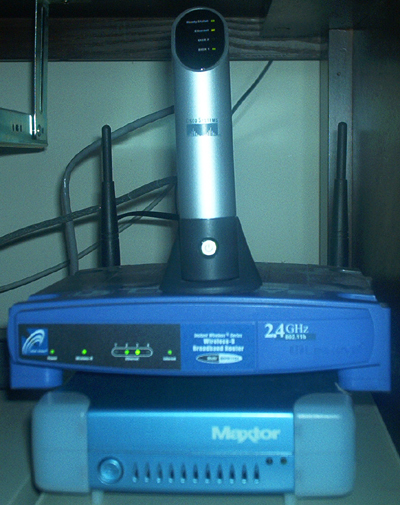
Lastly, if you are interested, here’s a picture of mine in action:

My NSLU2, Linksys wireless router, and Maxtor USB 2.0 Hard Drive.
From top to bottom: My NSLU2, Linksys wireless router, and Maxtor USB 2.0 Hard Drive, all sitting on top of my old web server.