As of around 12:53 PM PST, Gmail was (and still is) down.
On their status page it said:

Google Apps Status
September 1, 2009 12:53:00 PM PDT
We’re aware of a problem with Google Mail affecting a majority of users. The affected users are unable to access Google Mail. We will provide an update by September 1, 2009 1:53:00 PM PDT detailing when we expect to resolve the problem. Please note that this resolution time is an estimate and may change.

Having nervous ticks due to Google’s Gmail service being down? Read on… [continue reading…]
Very quick and easy tip today – you may already know this one…

If you are browsing a web page in mobile Safari on your iPhone, you can fast scroll to the top of the page simply by tapping the clock in the “titlebar” at the top edge of your screen.

This is very handy, especially when reading an extremely long web page. It sure beats sweeping your finger repeatedly.

That’s all there is to it! Tap the clock! I told you it was quick and easy.

Do you have any iPhone tips, tricks, or suggestions? Please leave a comment below. Thanks for reading the site.

Want to save some battery life on your iPhone AND increase your security? Well, this 2-for-1 tip should do the trick. Ready? Here it is:

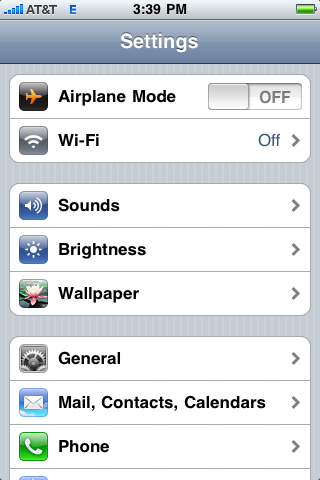
From your iPhone’s home screen, tap “Settings.” You will see this screen:

iPhone Settings

Figure 1: iPhone Settings

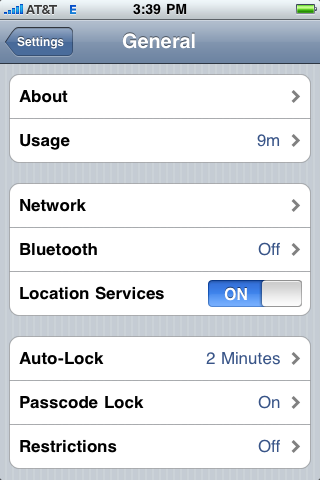
Next, tap “General,” and you will see:

iPhone General Settings

Figure 2: General iPhone Settings

You may change or set “Auto-Lock.” I have mine set to 2 minutes. With this setting, my screen will lock after 2 minutes and save some battery life for me.

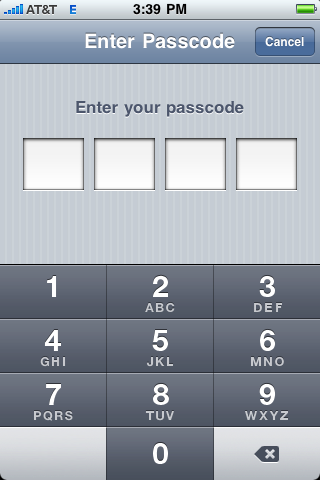
To set a password (or passcode) to unlock the screen, tap “Passcode Lock”:

iPhone Enter Passcode

Figure 3: Set your passcode

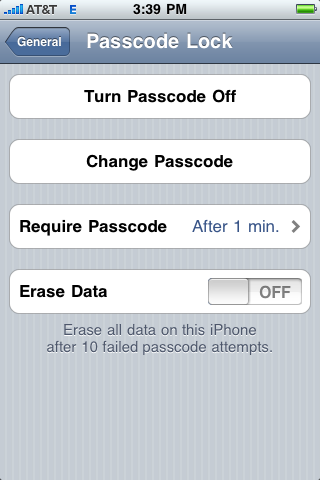
It will ask twice, to make double-sure that the code you choose was entered correctly. You will then see the following screen, which outline options for changing the passcode or disabling it at another time:

iPhone Passcode Options

Figure 4: Passcode options

For now you can leave these settings alone, or change them if you wish. It’s your iPhone, I’m not the boss of you.

Do you have an iPhone tip or trick that you’d like to share? Please leave a comment below. Thanks for stopping by the site.